Saturday, January 18, 2020

Constants in C++

January 18, 2020 0
Constants are like a variable, except that their value never changes during the program execution once defined.

What are Constants?

Constants refer to as fixed values, unlike variables whose value can be altered, constants - as the name implies does not change, they remain constant. Constant must have to be initialized at the time of creating it, and new values cannot be assigned later to it.
  • Constants are also called literals.
  • Constants can be any of the data types.
  • It is considered best practice to define constants using only upper-case names.

Constant Definition in C++

There are two other different ways to define constants in C++. These are:
  • By using const keyword
  • By using #define preprocessor
Constants are like a variable, except that their value never changes during the program execution once defined.


What are Constants?

Constants refer to as fixed values, unlike variables whose value can be altered, constants - as the name implies does not change, they remain constant. Constant must have to be initialized at the time of creating it, and new values cannot be assigned later to it.
  • Constants are also called literals.
  • Constants can be any of the data types.
  • It is considered best practice to define constants using only upper-case names.

Constant Definition in C++

There are two other different ways to define constants in C++. These are:
  • By using const keyword
  • By using #define preprocessor

Constant Definition by Using const Keyword

Syntax:
const type constant_name;
Example:
#include <iostream>
using namespace std;

int main()
{
  const int SIDE = 50;
  int area;
  area = SIDE*SIDE;
  cout<<"The area of the square with side: " << SIDE <<" is: " << area << endl;
  system("PAUSE");
  return 0;
}
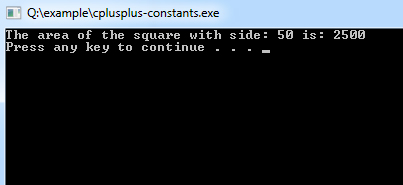
Program Output:
cplusplus-constants
It is also possible to put const either before or after the type.
int const SIDE = 50;
or
const int SIDE = 50;

Constant Definition by Using #define preprocessor

Syntax:
#define constant_name;
Example:
#include <iostream>
using namespace std;

#define VAL1 20   
#define VAL2  6
#define Newline '\n'

int main()
{
   int tot; 
   tot = VAL1 * VAL2;
   cout << tot;
   cout << Newline;
}

Keywords in C++

January 18, 2020 0
The C++ Keywords must be in your knowledge because you can not use them as a variable name. 

C++ Keywords List

You can't use keyword as identifier in your C++ programs, its reserved words in C++ library and used to perform an internal operation.


In addition, the following words are also reserved:
Andbitornot_eqxor
and_eqcomplorxor_eq
bitandnotor_eq
You should also try to avoid using names from the C++ library, e.g. swap, max.

Token in C++

January 18, 2020 0
As mentioned earlier, C++ is the superset of C and so most constructs of C are legal in C++ with their meaning and usage unchanged. So tokens, expressions, and data types are similar to that of C. It also is preferred to understand the concepts of C before learning C++. However, there are some exceptions and additions in C++ which you will not get in C. In this chapter, you will learn about what are tokens, and the different types of tokens, expressions, and basic data types.


What are Tokens

Each word and punctuation is referred to as a token in C++. Tokens are the smallest building block or smallest unit of a C++ program.
These following tokens are available in C++:

Identifiers

Identifiers are names given to different entries such as variables, structures, and functions. Also, identifier names should have to be unique because these entities are used in the execution of the program.

Keywords

Keywords are reserved words which have fixed meaning, and its meaning cannot be changed. The meaning and working of these keywords are already known to the compiler. C++ has more numbers of keyword than C, and those extra ones have special working capabilities.

Operators

C++ operator is a symbol that is used to perform mathematical or logical manipulations.

Constants

Constants are like a variable, except that their value never changes during execution once defined.

Strings

Strings are objects that signify sequences of characters.

Manipulators in C++

January 18, 2020 0
Manipulators are operators used in C++ for formatting output. The data is manipulated by the programmer's choice of display.


Some of the more commonly used manipulators are given below:

endl Manipulator

endl is the line feed operator in C++. It acts as a stream manipulator whose purpose is to feed the whole line and then point the cursor to the beginning of the next line. We can use \n (\n is an escape sequence) instead of endl for the same purpose.

setw Manipulator

This manipulator sets the minimum field width on output.
Syntax:
setw(x)
Example:
/* 
* File: main.cpp
* Author: Gautam
* Created on October 16, 2011, 12:58 PM
*/#include <iostream>
#include <iomanip>
using namespace std;

int main() {

float basic, ta,da,gs;
basic=10000; ta=800; da=5000;
gs=basic+ta+da;
cout<<setw(10)<<"Basic"<<setw(10)<<basic<<endl
<<setw(10)<<"TA"<<setw(10)<<ta<<endl
<<setw(10)<<"DA"<<setw(10)<<da<<endl
<<setw(10)<<"GS"<<setw(10)<<gs<<endl;
return 0;
}
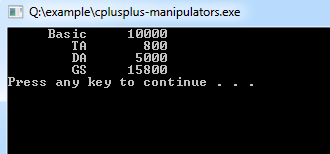
Program Output:
cplusplus-manipulators

setfill Manipulator

This is used by the setw manipulator. If a value does not entirely fill a field, then the character specified in the setfill argument of the manipulator is used for filling the fields.
Example:
/* 
* File: main.cpp
* Author: Gautam
* Created on October 16, 2011, 12:58 PM
*/#include <iostream>
#include <iomanip>
using namespace std;

int main() {
cout << setw(20) << setfill('*') << "w3schools.in" << setw(20) << setfill('*')<<"Test"<< endl;
}
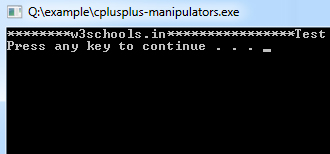
Program Output:
cplusplus-setfill-manipulators

IMG Scroll Animation (yes/no)

recent/hot-colored